

Digital Service Desk Strategy helps organizations create a connected support experience that combines human assistance, self service tools, automation, AI, and digital workflows into a single system. For hiring managers, HR leaders, and business decision makers, understanding how a digital service desk operates is essential for improving employee support, increasing productivity, and creating more efficient service delivery processes.
Unlike traditional support models that rely heavily on emails, phone calls, and manual ticket handling, a digital service desk gives employees multiple ways to find answers, submit requests, resolve issues, and track progress. A successful strategy ensures these tools work together seamlessly while supporting both employee needs and organizational goals.
Traditional Service Desk vs Digital Service Desk
Understanding the difference between a traditional service desk and a digital service desk is the foundation of building an effective strategy.
A traditional service desk typically depends on direct interaction with support staff. Employees contact a support team through phone calls, emails, or tickets and wait for assistance from an agent.
A digital service desk expands this model by integrating technology and automation throughout the support process.
A Digital Service Desk may include:
- Self service portals
- Knowledge bases
- AI powered chatbots
- Automated workflows
- Service request catalogs
- Ticket management systems
- Live support agents
- Mobile support applications
The goal is not to replace human support. Instead, it is to create a support ecosystem where routine tasks can be handled quickly while complex issues receive expert attention.
How Employees Experience a Digital Service Desk

From an employee perspective, a digital service desk serves as a single destination for workplace support.
Rather than contacting multiple departments, employees can access a centralized portal where they can find answers, submit requests, and receive assistance.
A typical employee experience may look like this:
Finding Answers Through Self Service
An employee encounters a problem with software access.
Instead of waiting for a support representative, they search the knowledge base and find a step by step solution. The issue is resolved immediately without opening a ticket.
Using Automated Support
An employee forgets a password.
The digital service desk provides an automated password reset workflow that verifies identity and restores access within minutes.
Requesting Services
A new employee needs access to business applications.
The employee submits a request through the service portal. The system automatically routes approvals, creates tickets, notifies the appropriate teams, and updates the employee on progress.
Escalating Complex Issues
When a problem cannot be solved through automation or self service, the request is transferred to a service desk professional who can provide personalized assistance.
This combination of technology and human expertise creates a more efficient support experience.
Core Components of a Digital Service Desk Strategy
A successful Digital Service Desk Strategy depends on several key components working together.
Self Service Portal
The self service portal is often the primary entry point for employees.
It provides access to:
- Service requests
- Knowledge articles
- Ticket status updates
- Forms and approvals
- Frequently asked questions
An intuitive portal encourages employees to solve simple issues independently.
Knowledge Management
Knowledge management helps employees find accurate information without contacting support teams.
Organizations should maintain documentation covering:
- System access procedures
- Software troubleshooting
- HR policies
- Employee onboarding resources
- Common workplace requests
Accurate knowledge resources reduce ticket volume and improve employee satisfaction.
Service Request Catalog
A service catalog provides a structured list of available services.
Examples may include:
- Equipment requests
- New employee onboarding
- Software installation
- Access permissions
- Benefits inquiries
- Employee record updates
Standardized requests improve consistency and simplify support operations.
Ticket Management
When requests require additional assistance, ticket management systems help track and prioritize issues.
Effective ticket management includes:
- Automatic routing
- Priority assignment
- Escalation procedures
- Progress tracking
- Resolution documentation
These processes ensure requests are handled efficiently and transparently.
Automation in a Digital Service Desk
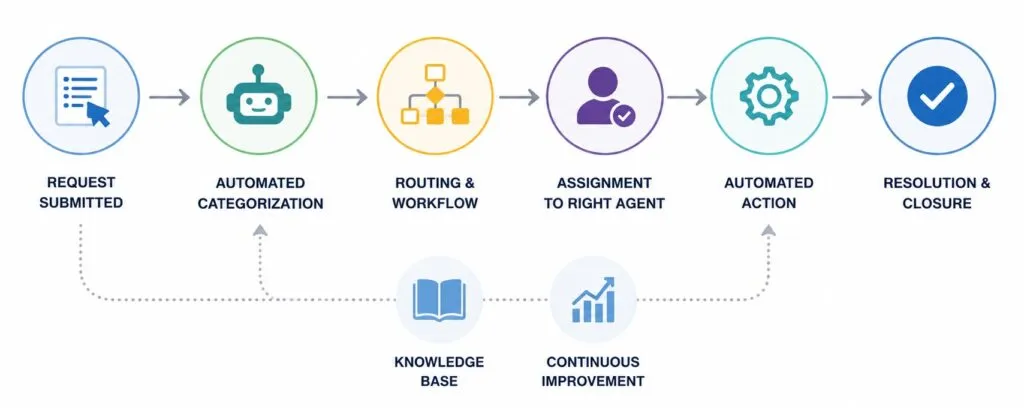
Automation is one of the most valuable elements of a Digital Service Desk Strategy.
By automating repetitive tasks, organizations reduce workloads while improving response times.
Common automated processes include:
- Password resets
- User account creation
- Software deployment
- Access approvals
- Ticket routing
- Status notifications
Automation enables service teams to focus on more complex issues that require human expertise.
Workflow Automation
Digital workflows eliminate unnecessary manual steps.
For example, when an employee requests software access, the system can:
- Receive the request
- Route it for manager approval
- Create a support ticket
- Assign the request to the correct team
- Notify the employee of progress
- Confirm completion
These workflows increase efficiency while maintaining consistency.
AI and the Modern Digital Service Desk
Artificial intelligence has become an important component of many digital service desk environments.
AI helps organizations provide faster support while improving the user experience.
Common AI applications include:
- Virtual assistants
- Intelligent chatbots
- Automated ticket categorization
- Predictive support recommendations
- Knowledge article suggestions
AI can often resolve routine inquiries without requiring direct involvement from support staff.
For more complex situations, AI assists agents by recommending solutions and identifying relevant information.
Building a User Focused Service Desk Strategy
Technology alone does not create an effective digital service desk.
Organizations must design support experiences around employee needs.
Simplify Access to Support
Employees should be able to access assistance quickly without navigating complicated systems.
Support channels may include:
- Service portals
- Mobile apps
- Chat platforms
- Email support
- Virtual assistants
The easier it is to access support, the more likely employees are to use available resources.
Reduce Friction
Every additional step in the support process can increase frustration.
Organizations should evaluate:
- Request forms
- Approval processes
- Portal navigation
- Authentication requirements
Simplified workflows improve employee satisfaction and increase adoption.
Provide Transparency
Employees want visibility into their requests.
Digital service desks should provide:
- Real time status updates
- Estimated completion times
- Automated notifications
- Escalation information
Transparency builds trust and improves the overall support experience.
How Management Teams Build a Digital Service Desk Strategy

Management teams play a critical role in designing and maintaining successful digital service desk operations.
A strong strategy begins with understanding employee needs and identifying opportunities to improve support delivery.
Define Service Goals
Organizations should establish measurable objectives such as:
- Faster resolution times
- Improved employee satisfaction
- Increased self service adoption
- Reduced ticket volume
- Higher first contact resolution rates
Clear goals provide direction for service desk initiatives.
Identify High Volume Requests
Management teams should analyze support data to determine which requests occur most frequently.
These requests often represent the best opportunities for automation and self service improvements.
Create Standardized Processes
Consistency is essential for scalability.
Organizations should document:
- Request workflows
- Escalation procedures
- Approval requirements
- Service level expectations
Standardized processes improve reliability and service quality.
Align HR and IT Support
Many organizations now use digital service desks to support both HR and IT functions.
This integrated approach allows employees to access assistance for:
- Onboarding
- Benefits questions
- Equipment requests
- Access management
- Policy inquiries
- Employee records
A unified service experience reduces complexity and improves efficiency.
Measuring Digital Service Desk Performance
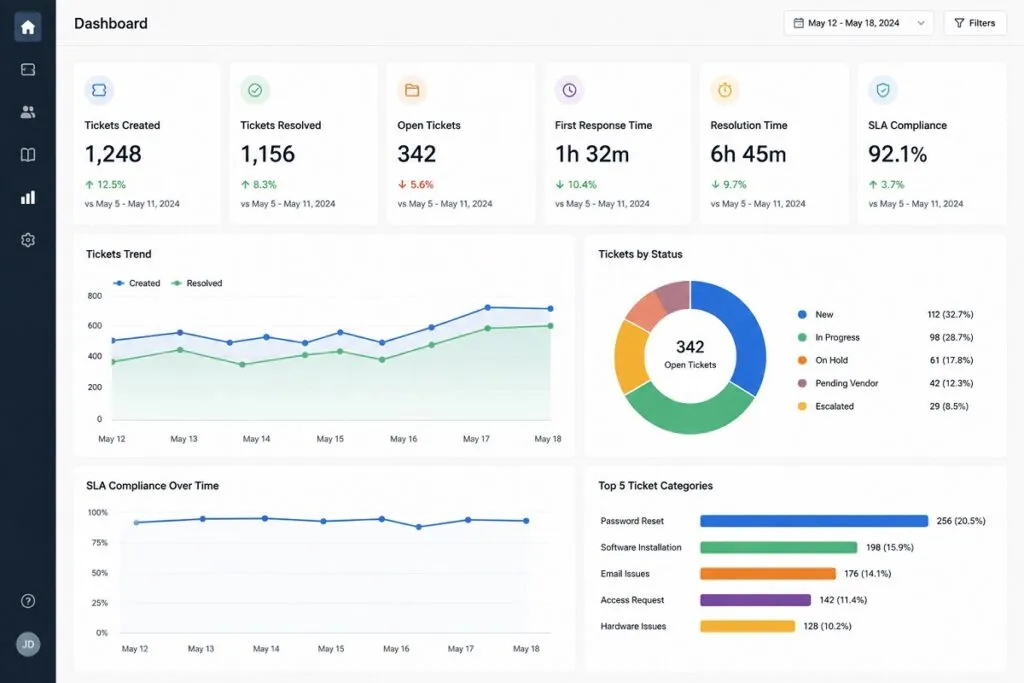
A Digital Service Desk Strategy should include ongoing performance measurement.
Tracking key metrics helps organizations identify strengths and improvement opportunities.
Common performance indicators include:
- Average resolution time
- Employee satisfaction scores
- Self service usage rates
- Ticket backlog volume
- First contact resolution rate
- Service level agreement compliance
Regular reporting provides valuable insights into service effectiveness.
Using Analytics to Improve Service Delivery
Analytics can reveal:
- Recurring support issues
- Knowledge gaps
- Automation opportunities
- Resource constraints
- Employee support trends
These insights help management teams make informed decisions and optimize service delivery.
Scaling Digital Service Desk Operations
As organizations grow, support demands increase.
A scalable Digital Service Desk Strategy ensures that service quality remains consistent even as request volumes expand.
Scalability can be achieved through:
- Expanded self service capabilities
- Increased automation
- AI powered support tools
- Centralized knowledge management
- Standardized workflows
By creating a balance between human expertise, self service resources, automation, and AI driven support, organizations can deliver efficient service experiences that support employee productivity and business growth. A well planned Digital Service Desk Strategy transforms support operations from a reactive function into a streamlined digital experience that benefits employees, management teams, and the organization as a whole.