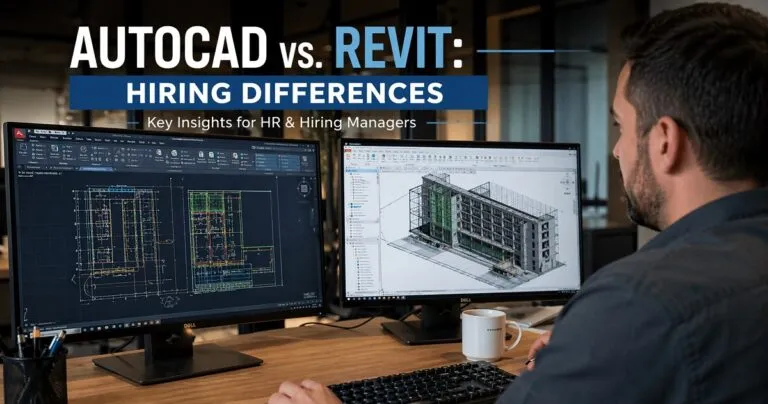
AutoCAD vs. Revit hiring differences are a critical consideration for hiring managers and HR professionals looking to build efficient design and construction teams. While both skill sets fall under CAD and BIM hiring, the expectations, candidate profiles, and evaluation criteria vary significantly depending on whether you are hiring for AutoCAD or Revit expertise.
Understanding these differences helps reduce hiring mistakes, improve project outcomes, and ensure alignment between technical capabilities and business needs.
Hiring Priorities: Drafting Efficiency vs. Model-Based Collaboration

One of the most important distinctions in AutoCAD vs. Revit hiring lies in what each role prioritizes.
AutoCAD hiring typically focuses on precision drafting and speed. Candidates are expected to produce accurate 2D drawings and detailed technical documentation quickly.
Revit hiring, on the other hand, emphasizes building information modeling workflows. Employers look for candidates who can manage complex 3D models and collaborate across disciplines.
Key hiring differences
- AutoCAD roles prioritize drafting speed, layer management, and drawing accuracy
- Revit roles prioritize model coordination, data integration, and collaboration
- AutoCAD candidates are often evaluated on output volume
- Revit candidates are evaluated on workflow efficiency and team integration
This shift in priorities directly impacts job descriptions, interview questions, and technical assessments.
Skill Set Expectations in Candidates
Hiring managers need to evaluate completely different competencies depending on the software focus.
AutoCAD candidate expectations
AutoCAD hiring focuses on technical drafting expertise and consistency.
- Strong 2D drafting skills
- Proficiency with layers, blocks, and annotations
- Ability to read and interpret construction documents
- High attention to detail and accuracy
- Fast turnaround on revisions
Candidates are often judged by how efficiently they can produce clean, organized drawings.
Revit candidate expectations
Revit hiring requires a broader and more strategic skill set.
- Experience with BIM workflows and standards
- Ability to manage parametric families
- Understanding of multidisciplinary coordination
- Knowledge of clash detection and model integrity
- Experience working in shared models
Revit candidates are expected to think beyond drawings and contribute to project coordination.
Differences in Job Descriptions and Requirements
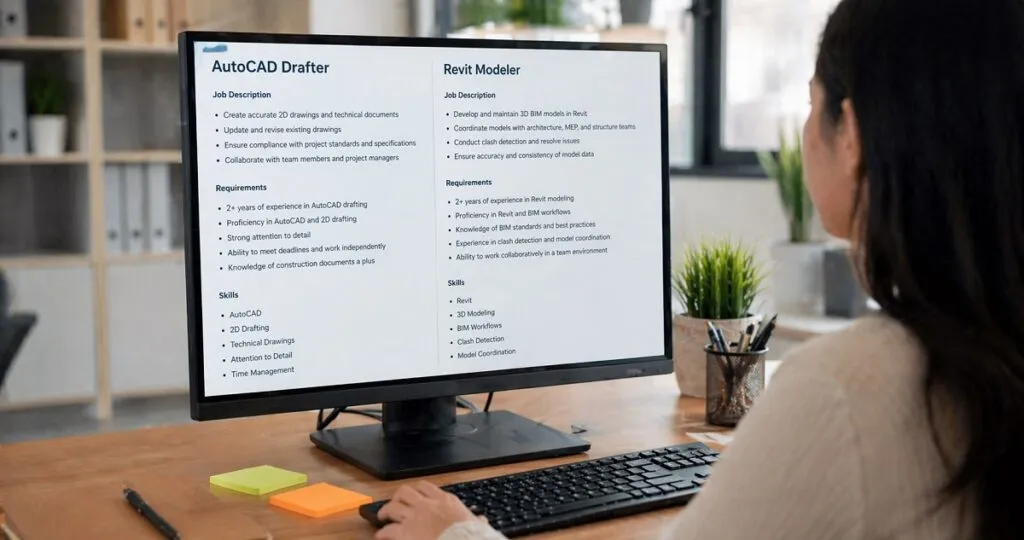
The way roles are written and advertised reflects deeper hiring differences.
AutoCAD job descriptions
AutoCAD job postings tend to be task-oriented and specific.
They often include responsibilities such as producing construction drawings, updating plans, and maintaining drafting standards. Requirements are typically focused on years of experience with AutoCAD and familiarity with industry-specific drawing conventions.
Revit job descriptions
Revit job postings are more workflow-driven and collaborative.
They highlight responsibilities such as managing BIM models, coordinating with architects and engineers, and ensuring data accuracy across project teams. Requirements often include BIM experience, knowledge of project lifecycle stages, and collaboration tools.
What hiring managers should adjust
- AutoCAD roles should emphasize precision and production output
- Revit roles should emphasize collaboration and system thinking
- Revit job descriptions should include BIM standards and coordination experience
- AutoCAD roles can remain more execution-focused
Interview Process Differences
The interview process should be tailored to reflect the nature of the work.
AutoCAD interview approach
AutoCAD interviews are typically focused on technical execution.
Hiring managers often assess:
- Drafting speed through timed tests
- Accuracy in reading and reproducing drawings
- Knowledge of shortcuts and efficiency techniques
- Ability to follow instructions precisely
Practical tests are usually short and focused on producing a clean drawing.
Revit interview approach
Revit interviews are more comprehensive and scenario-based.
Hiring managers assess:
- Understanding of BIM workflows
- Ability to troubleshoot model issues
- Experience working in collaborative environments
- Knowledge of families, templates, and project setup
Candidates may be asked to explain past projects or walk through a model-based workflow rather than complete a simple task.
Portfolio and Work Sample Evaluation
Evaluating candidate portfolios differs significantly between AutoCAD and Revit hiring.
AutoCAD portfolios
AutoCAD portfolios are judged based on clarity and accuracy.
Hiring managers should look for:
- Clean, well-organized drawings
- Consistent use of layers and annotations
- Attention to detail in dimensions and layouts
- Variety in drawing types
The focus is on visual precision and drafting standards.
Revit portfolios
Revit portfolios require deeper evaluation.
Hiring managers should look for:
- Complex model structures
- Evidence of coordination across disciplines
- Use of parametric families
- Documentation generated from models
- Screenshots or walkthroughs of projects
The emphasis is on how the candidate builds and manages information, not just the final output.
Salary Expectations and Market Demand

AutoCAD vs. Revit hiring differences also extend to compensation and demand.
Revit professionals are often in higher demand due to the industry shift toward BIM. This can influence salary expectations and hiring timelines.
AutoCAD hiring trends
- Larger talent pool
- Faster hiring cycles
- Lower to mid-range salary expectations
- Common in legacy workflows and smaller projects
Revit hiring trends
- Smaller, more specialized talent pool
- Longer hiring cycles
- Higher salary expectations
- Strong demand in large-scale and modern projects
Hiring managers should be prepared for increased competition when recruiting Revit talent.
Training and Onboarding Considerations
Hiring decisions should account for onboarding complexity.
AutoCAD onboarding
AutoCAD onboarding is generally straightforward.
- Minimal ramp-up time
- Easier integration into existing workflows
- Focus on company-specific drafting standards
Revit onboarding
Revit onboarding requires more structured planning.
- Training on BIM standards and processes
- Coordination with multiple teams
- Familiarization with shared models and templates
Revit hires may take longer to reach full productivity but contribute more strategically over time.
Team Structure and Hiring Strategy

The structure of your team should influence your hiring approach.
When to prioritize AutoCAD hiring
- Projects require high-volume drafting
- Workflows are primarily 2D
- Budget constraints limit hiring flexibility
- Speed and output are the primary goals
When to prioritize Revit hiring
- Projects involve multidisciplinary coordination
- BIM deliverables are required
- Long-term scalability is a priority
- Collaboration across teams is essential
Hybrid hiring strategies
Many organizations benefit from a mix of both skill sets.
- AutoCAD professionals handle detailed drafting tasks
- Revit professionals manage models and coordination
- Teams can balance speed with strategic oversight
Hiring managers should align hiring decisions with project requirements rather than defaulting to one tool.
Common Hiring Mistakes to Avoid
Understanding AutoCAD vs. Revit hiring differences helps prevent costly errors.
Mistakes in AutoCAD hiring
- Overlooking speed and efficiency
- Ignoring attention to detail
- Assuming all CAD experience is interchangeable
Mistakes in Revit hiring
- Hiring based only on software familiarity
- Ignoring BIM workflow experience
- Underestimating the importance of collaboration skills
Cross-hiring pitfalls
- Expecting AutoCAD professionals to immediately adapt to Revit workflows
- Assuming Revit professionals will excel at high-volume drafting tasks
- Using the same interview process for both roles
Each role requires a tailored hiring strategy to ensure success.
Choosing the Right Candidate for Your Needs
AutoCAD vs. Revit hiring decisions should always align with project goals, team structure, and long-term business strategy.
Hiring managers who clearly define expectations, adjust evaluation methods, and understand the differences in skill sets will make stronger hiring decisions. Whether the priority is drafting efficiency or collaborative modeling, selecting the right expertise ensures better project delivery and stronger team performance.